15-Minute PC Disaster Recovery in Wollongong
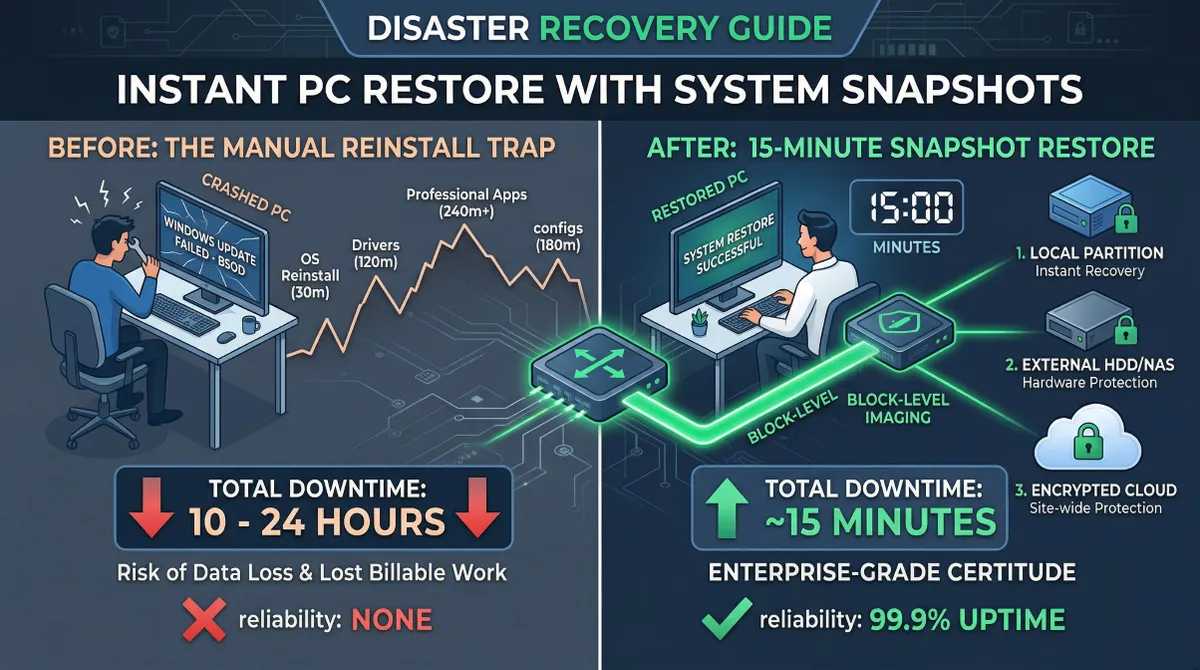
In large-scale data centres, when a server fails, engineers don’t reach for an installation disk. We trigger a System Snapshot. This allows us to revert the entire environment to a known “good state” in minutes.
Most home users, when faced with a “Blue Screen of Death” (BSOD) or a malware infection, resort to a “Clean Install.” This means hours of downloading drivers, re-configuring complex software, and losing browser bookmarks. It typically takes 12 to 48 hours to get back to 100%.
As an SRE, I believe in Reliability through Automation. For home offices and small businesses in the Illawarra, I implement systems that cut recovery time down to just 15 minutes.
Why Snapshots Beat Reinstallation
The Case Study: The “Lost Monday”
I recently assisted a freelancer in Wollongong whose PC failed during a Windows Update on a Monday morning.
- The Manual Way: He spent 6 hours reinstalling Windows and 10 hours reconfiguring Adobe plugins and fonts. He lost two full days of billable work.
- The Snapshot Way: With a proper snapshot strategy, he could have rebooted into a recovery environment, clicked “Restore,” and been back to work in 15 minutes—exactly where he left off on Friday afternoon.
Recovery Performance: Data Comparison
Based on All Round Tech internal testing, here is the efficiency gap between manual recovery and block-level snapshots:
| Task | Manual Reinstall | System Snapshot Restore |
|---|---|---|
| OS Boot Restoration | 30 mins | 2 mins |
| Drivers & OS Patches | 120 mins | 0 mins (Included) |
| Professional Software (IDE/Adobe) | 240 mins+ | 0 mins (Included) |
| Custom Configs & Plugins | 180 mins | 0 mins (Included) |
| Total Downtime | ~10 - 24 Hours | ~15 - 20 Minutes |
Implementing Enterprise-Grade Recovery
At All Round Tech, we deploy three core pillars of disaster recovery for our clients:
1. Block-Level Imaging
Unlike “File Backup,” block-level imaging copies every sector of your drive. Even if Windows won’t boot, we can “pour” the image back onto the disk via an external recovery tool.
2. Incremental Logic
You don’t need to back up 500GB every day. Using incremental technology, only the “blocks” that changed since the last backup are recorded.
- The Data: After the initial image, daily snapshots usually take only 3-5 minutes to complete.
3. The 3-2-1 Rule
SREs never trust a single point of failure. We store snapshots in:
- Local Partition (For instant recovery)
- External NAS/HDD (Protection against hardware failure)
- Encrypted Cloud (Protection against site-wide disasters)
Conclusion: Engineering Peace of Mind
In IT, a system crash isn’t a matter of “if,” it’s a matter of “when.” By building a robust disaster recovery framework, you aren’t just buying software—you are buying Certainty.
Modern home offices are now as complex as small businesses, but most tech support only fixes the surface. I started All Round Tech to bring the same bank-level security and rock-solid reliability I’ve used for major corporations over the past 20 years directly to your home.
Is your data “invincible”? Book a System Hardening Session