VLAN Isolation: Why Your IP Cameras Need a Secure Lane
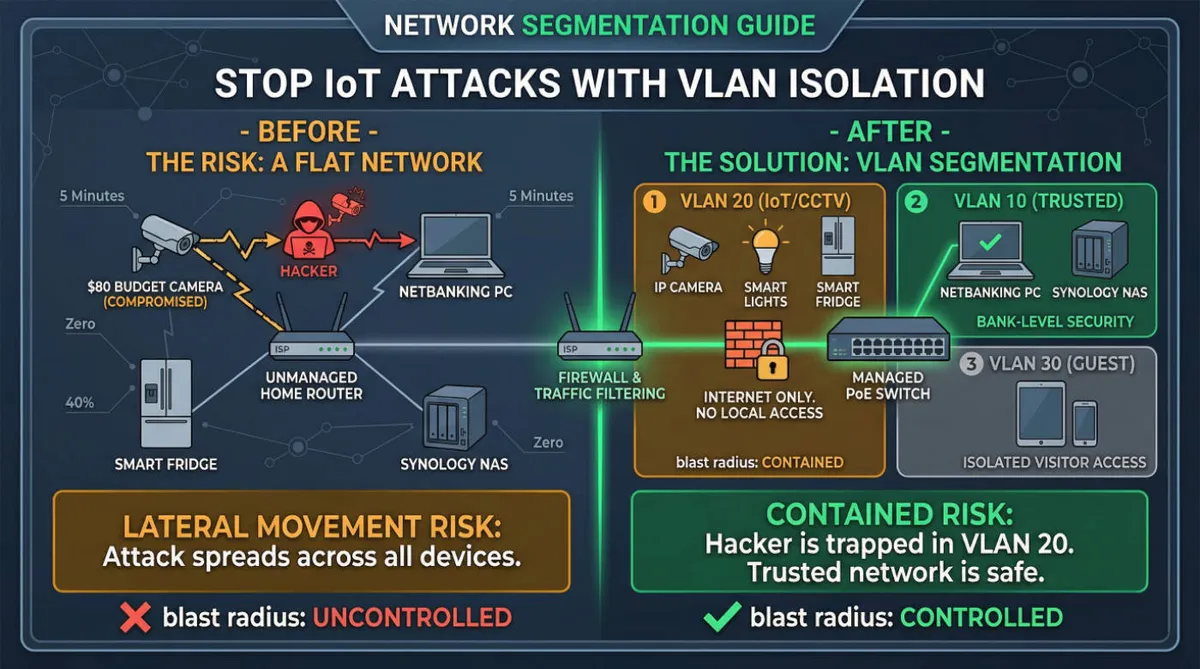
In the world of Site Reliability Engineering (SRE), we have a golden rule: Blast Radius Control. If one system is compromised, it should not be able to take down the entire infrastructure.
However, in many Wollongong homes and small offices, I see the exact opposite. Security cameras (IoT devices), smart fridges, and the PC used for high-stakes NetBanking are all sitting on the same flat network.
This is a ticking time bomb. Here is why VLAN (Virtual Local Area Network) Isolation is not a luxury—it’s a necessity.
The Real-World Risk: A Case Study
Last year, a popular brand of smart doorbell was found to have a critical vulnerability that allowed attackers to gain “root access” to the device.
The Scenario:
- The Entry: A hacker exploits a flaw in your $80 IP camera’s firmware.
- The Scan: Once inside the camera, they are now “inside” your home network. They run a simple scan (like
nmap) and see your MacBook and your Synology NAS. - The Theft: Because there is no isolation, they use “Lateral Movement” to target your PC. While you are logged into your bank, they are sniffing your unencrypted local traffic.
The Result: A $2,000 banking theft that started with a $80 “budget” camera.
By the Numbers: Why “Flat” Networks Fail
- 5 Minutes: The average time it takes for an unsecured IoT device to be scanned by bots once connected to the internet.
- 40%: The increase in “Lateral Movement” attacks in home-office environments since 2024.
- Zero: The number of layers between your hacker-vulnerable IoT device and your private data on a standard ISP-provided router.
The Solution: VLAN Segmentation
As a licensed security professional, I don’t just “plug cameras in.” I architect a segmented network using VLANs. Think of it as building firewalls between rooms in your digital house.
My Recommended “3-Zone” Architecture:
| VLAN ID | Name | Devices | Access Level |
|---|---|---|---|
| VLAN 10 | Trusted | Private PCs, Mobile Phones, NAS | Full Access |
| VLAN 20 | IoT/CCTV | IP Cameras, Smart Lights, Fridge | Internet Only (No Local Access) |
| VLAN 30 | Guest | Visitor Devices | Isolated Internet |
How It Protects You:
If your IP Camera in VLAN 20 gets hacked, the attacker is trapped. When they try to scan for your PC in VLAN 10, the firewall (managed by an Ikuai or Mikrotik router) drops the packet. The “Blast Radius” is contained to just the camera.
Why Most Handymen Miss This
Most installers understand how to get a picture on your phone, but they don’t understand Packet Filtering or Stateful Inspection.
Modern home offices are now as complex as small businesses, but most tech support only fixes the surface. I started All Round Tech to bring the same bank-level security and rock-solid reliability I’ve used for major corporations over the past 20 years directly to your home.
Check Your Home Today
If you can “see” your IP camera’s login page from the same Wi-Fi you use for banking without any firewall rules in between, you are at risk.
Ready to harden your network? We specialise in high-performance networking and secure CCTV integration in the Illawarra region. Let’s move your cameras to their own secure lane.
Don’t wait for a breach. Book a Network Security Audit